Last Updated: August 2026
I used to be very anti-tech in the practice room. No phones, no apps, no nothing — just pencil, paper, metronome, and tuner. Even as technologies evolved and better practice apps were developed, I still resisted. I thought it was too much of a distraction. And it totally can be — but that’s what airplane mode is for. Today, I use technology in the practice room every day — in ways you’re probably already using, like tuner and metronome apps, and in some other ways you maybe haven’t yet considered. In this post, I’m going to walk you through a few of my favorite apps that I use daily to plan my practice and practice my plan.
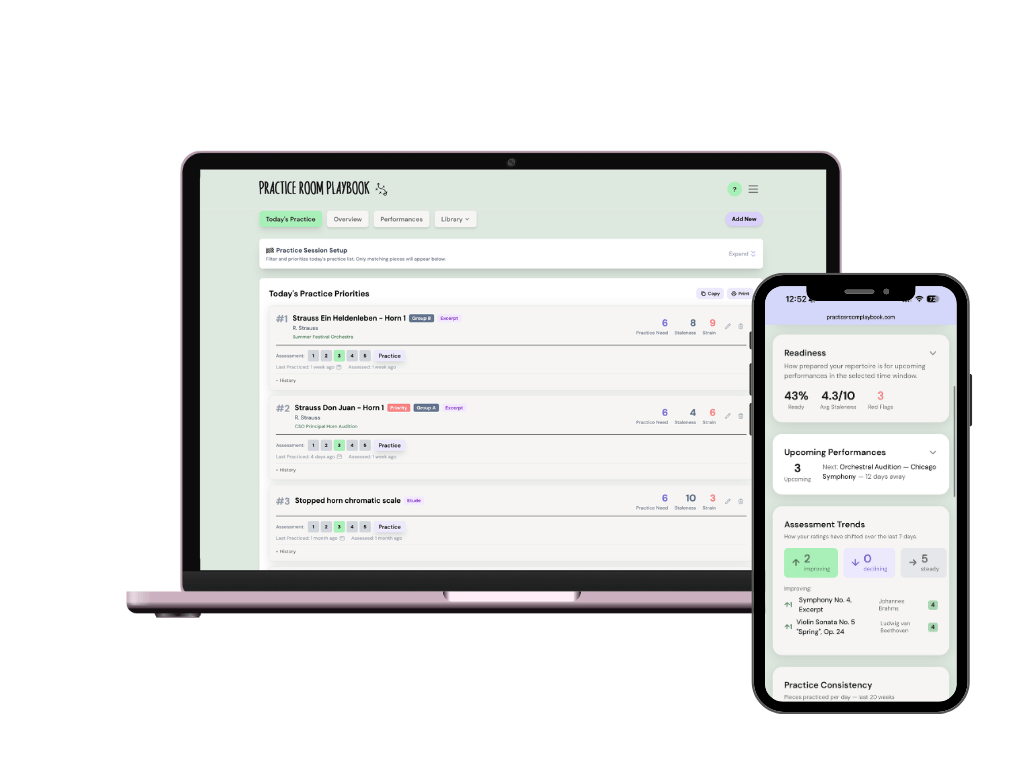
Practice Room Playbook
Web app (desktop and mobile, any device!)
Full disclosure: I'm starting with the one I built. Yes, I'm biased. But everything below came from years of actually using this stuff in the practice room, and I wouldn't put my own app first if I didn't genuinely think it belongs there. The rest of this list is just as real a recommendation as it's ever been — I use these too, and I'll tell you exactly why.
This one exists because of a problem none of these other apps actually solve: when you've got multiple performances coming up, or a pile of rep to prepare, how do you know what to practice today?
Practice Room Playbook helps you prioritize across everything you're juggling — so instead of guessing your way through a stack of pieces or splitting your attention evenly when it shouldn't be even, you actually know where the time needs to go. It's been in beta with real musicians since April, and it's headed toward a public launch this fall. If you want in early, join the waitlist here!

Screenshot of Tonal Energy.
Tonal Energy
iOS and Android
Let’s start with an app you’re probably already using — Tonal Energy. If you’re not, download it now! This is hands down the best tuner/metronome app available and only costs a few bucks. As a metronome alone, this app is exceptional, allowing for preset programming in ways most metronome apps have not yet developed. The tuner and drone functions are similarly wonderful, allowing you to toggle between “equal” and “just” temperament and adjust the sensitivity of the tuner, among many other things. On top of all of the basic tools, a unique element of Tonal Energy is the analysis function, which allows you to record a piece and play it back at a much slower speed — you can literally hear and see intonation discrepancies in slow motion. Seriously, the best on the market.

Screenshot of Seconds Pro
Seconds Pro
iOS and Android
Seconds Pro is an interval timer app designed originally for circuit training, introduced to me by Andrew Bain. This app is fantastic. If you’re struggling to keep your practice sessions efficient and on track, this is especially for you! Using this app, you can program exactly what you want to practice, the duration of each session, the duration of each excerpt or exercise, and how much rest between each piece… just “set it and forget it!” Click start, let it run, and the timer will tell you when to move onto the next excerpt. This is fantastic for those of us who plan to practice things for x-amount of time, but often go over (or under)! The latest version of the app even lets you specify beats per minute for each set. In other words, you can use the app as a built in metronome as well, if you choose.

Screenshot of Hours Pro — the times on the left show how much time I have logged in each category today. At the top, an active timer is running.
Hours
iOS and desktop only
Hours is a new discovery for me and has become a big part of my day-to-day life. I am a big fan of personal analytics — no surprise of someone who wrote a book on planning and assessing. With Hours, I basically track how much time I spend completing tasks in certain areas of my life throughout the day. You can organize it however you wish and track any element you can think of — you can even track tasks within tasks (like how much work you’re doing on excerpts versus fundamentals). While I use this for multiple areas of my life, you might choose to only track your practice — logging exactly how much time you are spending on each piece. At the end of each week, I can get a sense of where most of my time and energy is going and where I should make changes the following week. I find that when I see small numbers for an activity I thought I was doing a lot of — ahem, mental practice — I am much more likely to make a change the following day or week. And, let’s just say, it’s enlightening to see how much you really practice. The app is totally free, but the Pro upgrade unlocks additional features for the most nerdy among us.
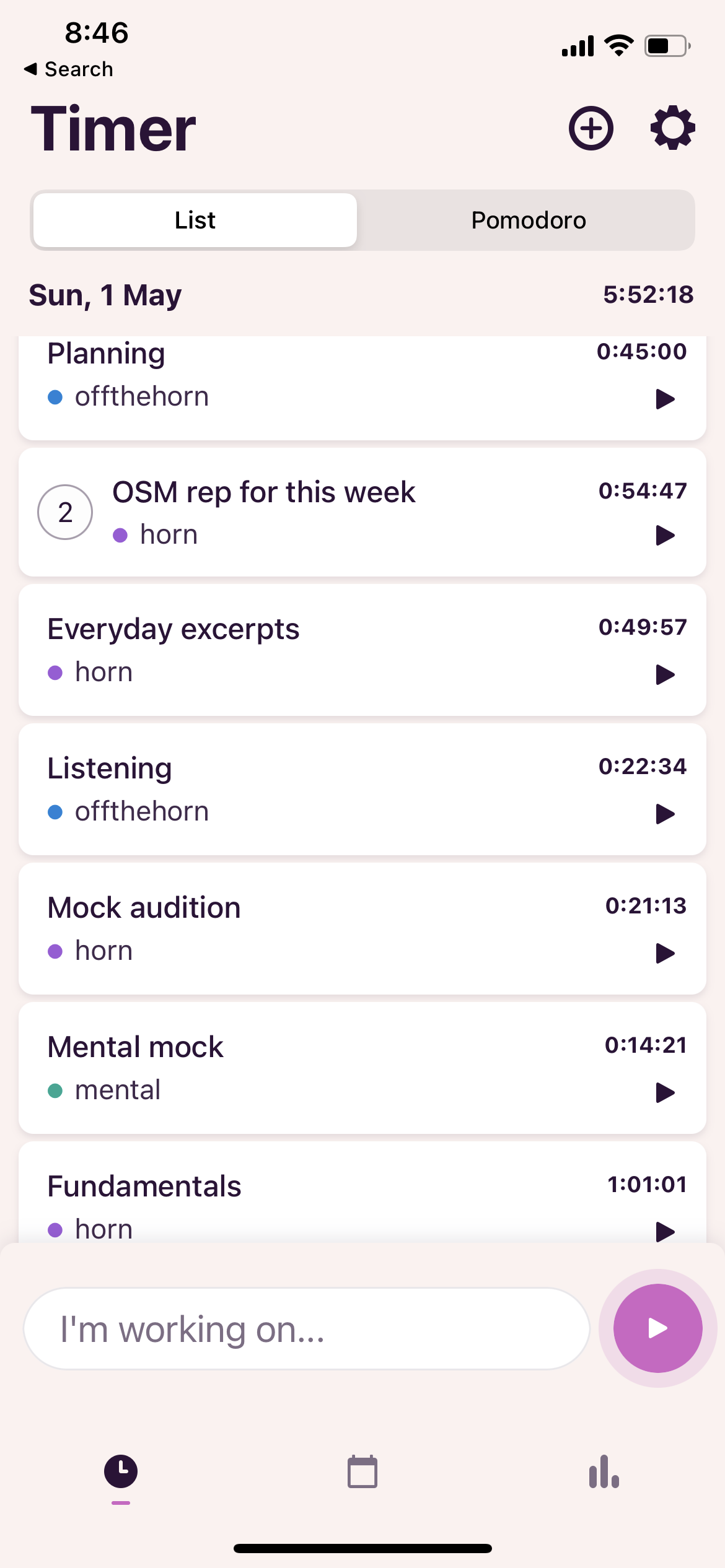
Screenshot of Toggl
Toggl Track
iOS and Android
Another time tracking app. I use this when I really want to get a sense of how my practice or preparation is really being divided. How much time am I spending on excerpts? On mental training? On listening? On fundamentals?
You can break things down however you want and even utilize a built-in Pomodoro timer for added productivity and focus. You can view your reports by day, week, month, or any custom range.
Musicians Hypnosis
iOS only; mp3s available for purchase online as well

Very simple interface — after all, your eyes will be closed while using this app! Here is a screenshot of a session built to focus only on auditions and confidence.
This one is a little hard to explain but an invaluable tool to have to strengthen your mental game and reduce stress at the same time. You might have heard clips of these recordings before there was an app, but they have since been expanded. The app lets you custom build your own hypnosis sessions, focusing on any number of topics, such as auditions, creativity, confidence, sight reading, stage fright, visualization, and more. (And please don’t be scared off by the word “hypnosis” — this isn’t some cartoon madman waving a pendulum to make you dance — think of it more like a deeply restful and intentioned relaxation). Many musicians I know listen to their custom sessions at night, before bed, getting their mind in the right place for the next day and helping them fall into a deep, restful sleep — which many of us struggle with especially as auditions approach! While the benefits of this app are plenty, if all you get out of it is better sleep… well, I think that alone is worth its weight in gold!
Read about how the app works or download the recordings separately here.

Screenshot of buddhify. The wheel is customizable — you can add and delete categories. Within each category are 5 or 6 different meditations of different lengths and focuses.
buddhify
iOS and Android
Another tool more for your mind than your intonation, buddhify is a guided meditation and mindfulness app designed for the busy, everyday person. A fantastic way to center yourself before you walk into the practice room everyday. Whether you’ve never meditated a day in your life or are a seasoned Zen master, you can find something very rewarding in this app. With a beautiful, simple interface, you can choose from all sorts of guided meditations for many different situations — simple, everyday situations like taking the bus or walking through the city, or dealing with difficult emotions like sadness and anger, or struggling to fall asleep, or just trying to “be here now.” The durations range from 3 or 4 minutes to upwards of 10 or 15. Really, this app is for anyone. Meditation is a great way to stay grounded, centered, and balanced, whether you’re preparing for an audition or not! This app has brought a lot of focus and clarity to many people’s lives and practicing — mine included!
Some other meditation apps to consider:
Rain Rain
iOS and Android

Screenshot of Rain Rain — a small collection of the sounds to choose from.
Rain Rain is a rain sounds app. You’re probably thinking… how on earth do you use this in the practice room? Well… I don’t. However, I do use this app at auditions. Ever take an audition where you’ve had to wait around in a group warm-up room? Or, ever take an audition where the individual warm-up rooms had paper-thin walls and you had to wait there for what seemed like hours while the guy next door played every excerpt on the list and, for some reason, every excerpt not on the list? I don’t want to hear any of that. But usually I don’t want to listen to music either — it’s too much stimulation, too much sound, and too much to focus on. Instead, I put on a pair of noise-cancelling headphones and play rain sounds. It’s both soothing and functional, drowning out external and internal noise and distraction. I can mentally rehearse the round ahead and even buzz or play a few notes to stay warm, without hearing a single Beethoven-7-up-an-octave from the next room over. You can mix a bunch of different rain sounds — city rain, forest rain, tent rain, etc. — or listen to different types of white noise altogether.
The Piano (or any other similar app)
There are a variety of these on all platforms.

Screenshot of the slidable keyboard in The Piano app.
This one I use all the time… in the mental practice room. This is a simple free app that shows an octave and a half of an animated piano and, of course, plays whichever pitches you click on. I do not have perfect pitch, so I use this when mentally practicing a piece to keep checking that I am hearing things correctly in my head and not gravitating away from the key — without ever having to touch the horn. After all, if your mental picture is fuzzy, your picture on the instrument will be too. For a while, I used the drone wheel of the Tonal Energy app for this, but as you move around the wheel, the octaves adjust. This is a much simpler, much more efficient app for mental practice.
(this specific app is only available via iOS, but there are countless piano apps on both platforms — just find one you like!)
Random Timer App (any)
This is probably my favorite tool in the practice app kit and I could write an entire article just on the creative ways to use this tool.
Random timers are great way to rehearse the unpredictability of audition day, specifically related to when we play. For example, a very simple exercise to practice with a random timer is as follows:
Warm up as you would on audition day.
Set the timer to go off at a random time between 20 and 60 minutes from now.
When the timer goes off, play one round of a mock audition for your recorder.
But that’s just the beginning. You can get so much more creative!
I especially like to use this to rehearse on-deck room cycles (what you do in the individual warm-up room before taking the stage). Even if the proctor gives you an estimate of how much time you have, it’s always a mystery when the knock on the door will really come. It can easily jolt you. But you can practice that feeling and how you will react. For example:
Warm up as you would on audition day.
Set the timer to go off at a random time between 10 and 30 minutes from now.
When the timer goes off, move to another room (or mentally/symbolically do so) and start your on-deck room cycles.
You are mentally on-deck now. Let’s say the imaginary proctor says you will have 30 minutes in here — we all know that can be a wild under- or over-estimation. Set your timer to go off at a random time between 15 and 45 minutes from now.
When the timer goes off, play a round for your recorder.
Get creative! For any part of the audition experience that involves a jolt of surprise, use this timer.
There are many free random timer apps out there but be sure to select one that lets you specify the parameters AND lets you hide just how long the countdown is — you want to be surprised.
Similarly, any Random Number Generator app
The random number generator is something I use simply for picking random rounds for mock auditions. I’ve got a version of my audition list with numbers assigned to each excerpt and if I want a truly random order to a mock round, I will use the number generator to eliminate any personal bias. As with the timer, any free app will do.